Inventory Architecture Upgrade: UI Subsystem, Quick Transfer Rules and more...
I have been caught up with some CP competitions, so I did not have time to work on the inventory as much, but I am back now and here is what I did since:
- UI Subsystem
- Inventory Parts as Data Assets
- Quick Transfer Rules
Let's go over all those features.
I added the UI Subsystem to decouple the UI logic from the actual inventory component and make it optional. Now you will be able to use your own UI systems with this inventory as the backend. The optional UI is still being worked on.
Previously I used enums (EInventoryPart) to differentiate between different inventory parts and it was confusing. Now I am transitioning to using data assets for them to make it possible to make parts in the editor without touching C++. They also include an optional icon parameter which you can use in your UI if you want.
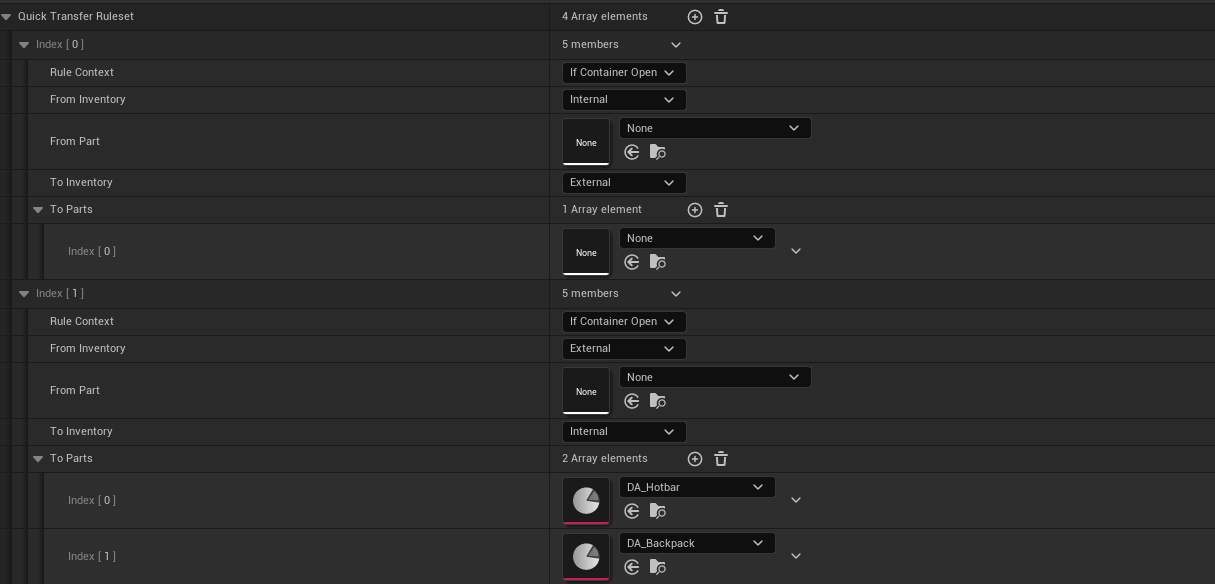
Now, onto the Quick Transfer Rules. Quick Transfer is triggered by doing a left click on an item while holding the quick transfer key (shift by default). You can now define where those items will end up in certain conditions.
For example if I always want to transfer to a chest if it is open regardless of which inventory part it is coming from I would use this rule:
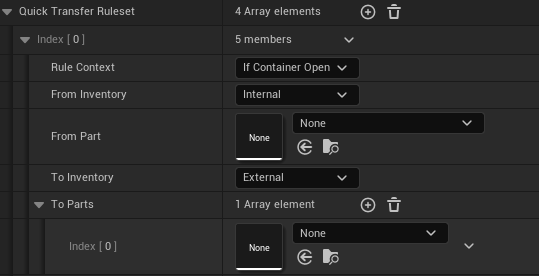
Rule Context has the following options:
- Always
- If Container Open
- If Container Closed
This of course indicates in which context will the rule be executed.
From Inventory and To Inventory have these options:
- Internal (On the actual player)
- External (In the world, for example chests)
From Part is the Inventory Part from which the item must be coming from for the rule to be executed.
To Parts is an array of Inventory Parts which will look for available slots in To Inventory in order. If an empty part is specified, it means any part is accepted (this will not be required later).
Of course, there is still some bugs to squash with the Quick Transfer Rules but most of the system is done.
After that I will focus on making the drop system work so items can actually be dropped from the inventory into the world.
Thanks for reading!
Comments ()